
Improving Tagging Quality in Azure

Updated: Dec 29, 2025
A Core FinOps Capability
Is your Controlling or Finance team struggling to charge back Azure costs to each individual dev team? You’re definitely not alone. Missing or inconsistent tagging can make cost allocation a real headache. With the right tagging strategy, however, you can simplify the process dramatically and make both your developers and your Controlling team happy.
Within any mature FinOps practice, tagging is more than just metadata, it’s the backbone of visibility, accountability, and cost optimization. In Microsoft Azure, resource tags provide the context that enables you to allocate spend accurately, track ownership, and automate governance. When tagging quality degrades, so does your ability to make informed financial decisions.
What Tagging Means in Azure
Tagging in Azure refers to assigning key value metadata (such as CostCenter, Application, Environment, or Owner) to resources, resource groups, or subscriptions. These tags don’t affect how a resource runs, but they add critical business context that connects technical assets to organizational structures. When applied consistently, tags make it possible to group resources logically, understand who owns what, and determine why a resource exists.
In other words, tagging is the bridge between cloud infrastructure and financial, operational, and organizational accountability. Without this bridge, cloud costs quickly become non-transparent and difficult to manage.
Why Tagging Quality is a FinOps Essential
High-quality tagging underpins nearly every FinOps activity, from chargeback and showback to optimization analysis and forecasting.
Consistent tagging enables:
Accurate cost allocation: Mapping spend to business units, projects, or environments is only possible with reliable tags.
Actionable reporting: FinOps dashboards and automation scripts depend on clean, standardized tag keys and values.
Governance at scale: Automated controls for budgets, policies, and optimization require structured tagging to function effectively.
Reduced financial drift: Poor tagging leads to untracked costs and errors in forecasting and chargeback models.
In short:

Enforcing Tagging
3.1 Establishing Enforced Tagging for New Resources
Azure provides several ways to enforce tagging standards from the start:
Azure Policy: Create policies that require specific tags (e.g., CostCenter, Owner, Environment, Project) before resource creation. You can even deny deployment if mandatory tags are missing. Policy definition:
The policy prevents deployment if even one of the required tags is missing. The list of tags can be expanded or modified through the parameter field. The policy can be assigned using Policy Assignments at the subscription, management group, or resource group scope.
Policy Assignments at Subscription or Management Group level: Ensure all new resources comply with organizational tagging standards across the environment.
Blueprints / ARM Templates / Bicep: Embed tagging logic directly into your Infrastructure-as-Code (IaC) deployments to ensure compliance by design.
By integrating tagging rules into your provisioning workflow, you prevent untagged resources from ever entering your cost base, significantly improving data hygiene and reducing manual clean-up.
3.2 Azure Policy

3.1.1 What does this policy do?
It denies the creation of any resource that is missing one or more required tags.
The required tags are:
CostCenter
Owner
Environment
Project
If any of these tags is missing, the resource deployment will fail.
3.1.2 Explanation of the main parts

Defines the list of mandatory tags.
This list can be customized when assigning the policy.

Applies to resources that support tags
Commonly used for standard Azure resources (VMs, Storage Accounts, App Services, etc.)

This means: If any one of the required tags does not exist, the condition evaluates to true
Each block checks:

Azure will block the creation or update of the resource.
3.1.3 Example: Not allowed

Missing CostCenter and Project → deployment is denied
3.1.4 Example: Allowed

Important notes:
The policy only checks whether the tags exist, not their values
Empty tag values ("") are still considered valid
The policy is not retroactive, it only applies to new or updated resources
3.3 Remediating and Monitoring Existing Subscriptions
Enforcing tagging on new deployments solves part of the problem, but most organizations already have legacy resources that lack proper tags.To address this, you can implement an automated remediation and escalation pipeline using Azure-native tools:
i. Detection:
Use an Azure Function or Logic App to regularly query Azure Resource Graph or the Cost Management API for resources with missing or invalid tags.
Optionally, store results in Log Analytics or Azure Table Storage for trend tracking.
Use third party BI Tools to display missing or invalid tags and include an API call
ii. Notification:
Automatically send email or Teams notifications to the identified Owner or subscription administrators with a remediation request.
iii. Escalation:
If tags are not corrected within a defined timeframe (e.g., 14 days), trigger an escalation workflow, such as a follow-up message, ticket creation, or policy enforcement.
iv. Automation:
Optionally, apply auto-remediation policies that assign default tags (e.g., Owner: Unknown) or move noncompliant resources into quarantine subscriptions.
This approach creates a continuous compliance loop, ensuring tagging integrity without manual audits.
The Cost and Control Impact
Improving tagging quality has measurable financial and operational benefits:
More accurate showback/chargeback reports and cost accountability.
Reduced “orphaned spend”, untagged or misattributed resources that inflate cloud bills.
Better forecasting and budgeting accuracy through complete cost attribution.
Automation-ready data for optimization insights and anomaly detection.
Robust tagging governance improves cost allocation accuracy and reporting reliability, as consistent tags make it easier to attribute spend to the correct teams and reduce manual reconciliation efforts (FinOps Foundation).
In practice, many organizations see an improvement in cost attribution accuracy and significant time savings in financial reporting once robust tagging governance is in place.
Conclusion
For Azure practitioners driving FinOps maturity, tagging quality is not optional, it’s foundational. By combining policy-based enforcement, automated detection, and remediation workflows, you establish sustainable tagging governance that supports cost transparency and operational efficiency.
Tagging may seem like a small technical detail, but in FinOps, it’s the detail that determines the accuracy of every financial insight you produce.
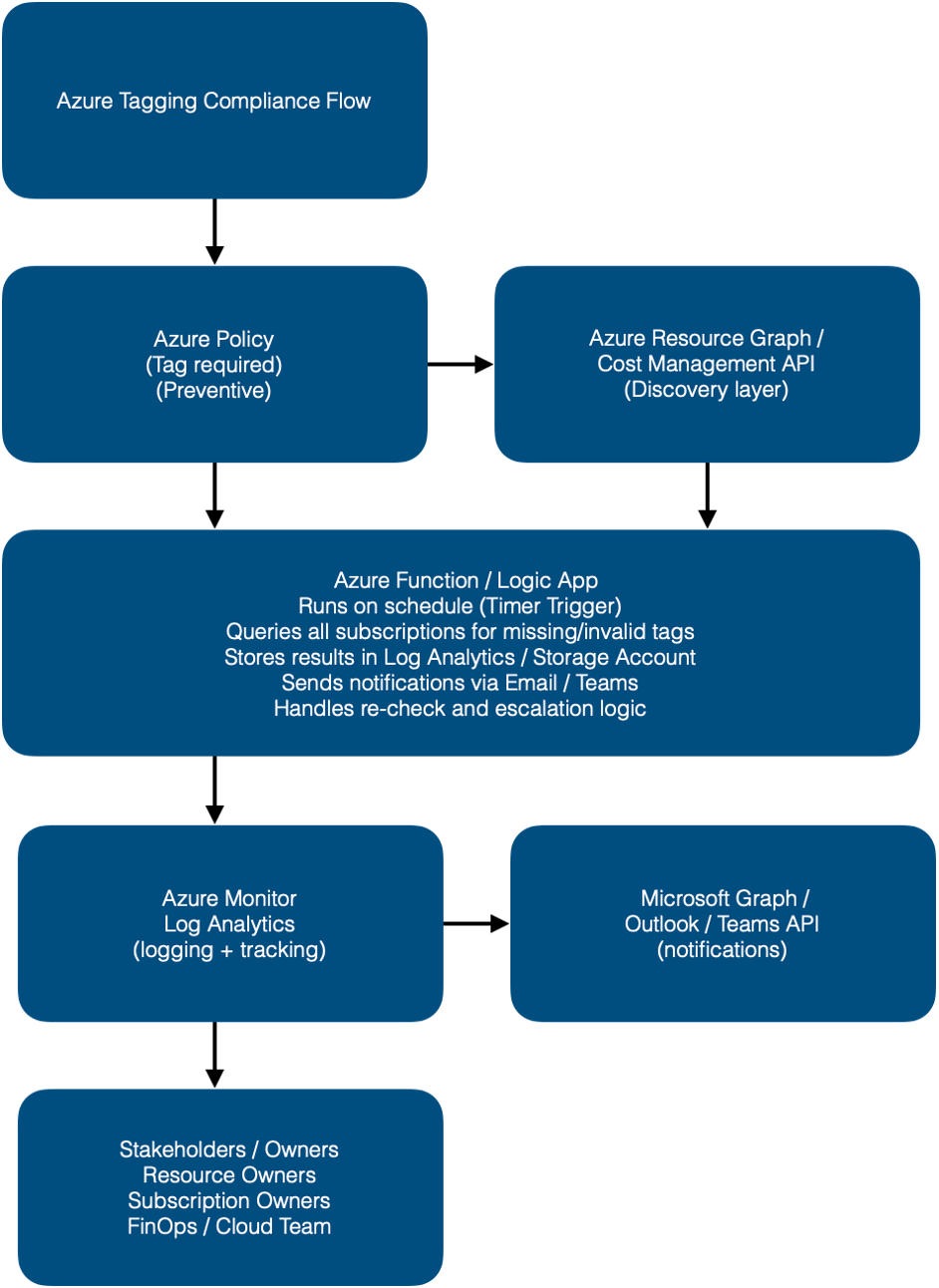
Process Flow Overview
Policy Enforcement
Azure Policy denies deployment if required tags are missing on new resources.
Scheduled Tag Audit
A timer-triggered Azure Function or Logic App runs daily or weekly.
It queries all resources using Azure Resource Graph for missing or invalid tags.
Result Storage
Noncompliant resources are logged in a Storage Account or Log Analytics workspace for tracking and trend reporting.
Owner Notification
Using Microsoft Graph API or Logic App connectors, the system sends a notification email/Teams message to each Owner tag or subscription admin.
Escalation Workflow
If no update after a defined period (e.g., 7 days), the system sends a follow-up reminder or creates a ticket in Azure DevOps / ServiceNow.
Remediation Option (Optional)
Optionally, an automated function applies a default tag (e.g., Owner: Unknown, Compliance: False) to maintain consistent tagging.
Optional Logic App Reminder :
(No-Code Tagging Automation with Azure Logic Apps, LeanIX, and Cloudability)
Azure Logic App Workflow Example

Trigger: Recurrence Example

Runs at 8:00 on Monday Every 2 week
Action 1 and 2 Example (API call, Parse JSON and Select)


Action 3 For each-action send E-mail Example



Comments